
Integration with Telegram
Initial Setup steps
With is integration, you can:
- Pair your Telegram chat group to a specific critical thinking space
- Create new posts
- Receive notifications of new posts
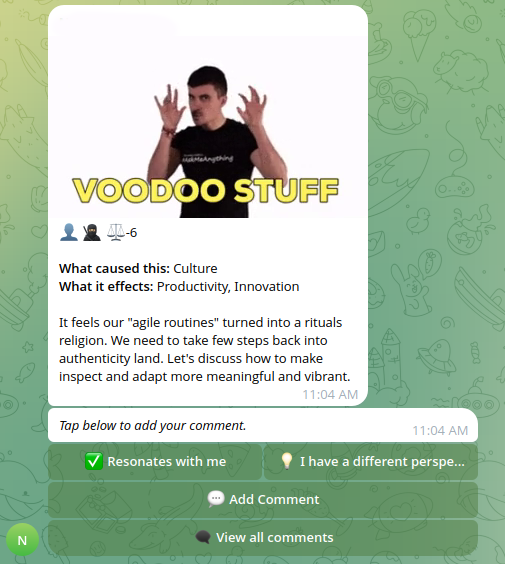
- For received notifications, add comment, reply, view all comments, view quiz and submit vote
- Broadcast snap surveys or confidence votes
- Customize language for button labels (his can be done in Neelix space Settings \ Integrations \ Channels)
Initial Setup steps
View this help by running /help once you added bot to your Telegram channel
━━━━━━━━━━━━━━━
⚙️ Setup
━━━━━━━━━━━━━━━
Login to Neelix. Ensure your front-end version auto-updated itself (minimum version is v 2.9.103).
1. Pair a Telegram channel with a Neelix space
Add this bot to your group:
- NeelixCriticalThinking (@neelix_critical_thinking_bot)
- Ensure the bot has permissions to post messages
Then run: /pair
Follow the prompts to select which Neelix space to link.
Actions that bot can take:
- Post message to a chat group (messages are form the space that you pair)
- Post direct message to users (this for allowing users create / reply directly from Telegram web view)
2. Link your personal Telegram account
So the bot can send you DMs and attribute your posts/reactions, proactively link your account using
/linkaccount command
━━━━━━━━━━━━━━━
📝 Common Commands
━━━━━━━━━━━━━━━
/newpost — Create a new experience post
The bot will send you a private DM with a button to open the post form\. Make sure you have started a chat with the bot first\.
/help — Show this guide
When a new post is shared in this channel, you will see three buttons:
• 💬 Add comment — Opens a comment form in Telegram WebView
• 💬 View all comments — Opens a list of all comments in Telegram WebView
• ✅ Resonates with me — Records a positive reaction
• 💡 I have a different perspective — Records an alternative viewpoint
When a comment is posted, you will see:
• ↩️ Reply — Opens a comment form in Telegram WebView
Support
Account specific queries
Please login to www.neelix.io with your account and create support ticket under "Account Support".
General bugs and enhancement requests
Please lodge a ticket under our Github support project.